16 Grouping and aggregating
Any changes you make to the code on this page, including your solutions to exercises, are temporary. If you leave or reload the page, all changes will be lost. If you would like to keep your work, copy and paste your code into a separate file or editor where it can be saved permanently.
16.1 Grouping
During data analysis, we often need to group data based on the values of one or more columns and compute summary statistics for each of these groups.
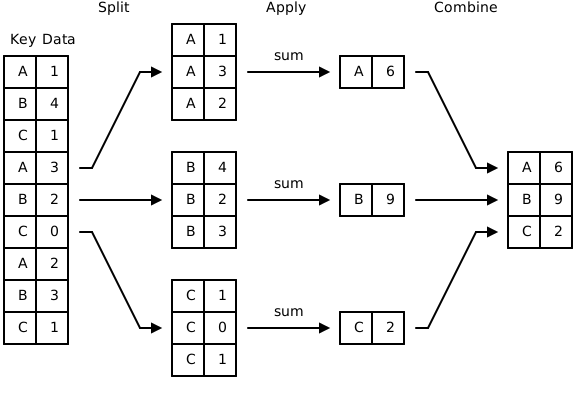
Let’s explore a few examples of grouping and aggregating using Seaborn’s tips dataset:
For example, how many tips were left by customers on each day? We can create a separate group for each day and then count the number of rows in each group:
The summary statistics methods that we previously used with Series and DataFrames can also be applied to summarize each group:
If we want to compute several summary statistics at once, we can use the .agg method (short for aggregate):
Note that the resulting columns form a hierarchical (multi-level) column index. To access a specific value column and its statistic, we use a tuple containing both levels of the column name:
We can also use the .agg method to specify different summary statistics for different columns:
Another way to use the .agg method is by using named arguments. The argument name serves as the column name in the resulting DataFrame, while the value is a tuple that specifies the source column and the aggregation function:
We can even aggregate data using our own custom summary functions with the .apply method:
This calculates the overall tipping ratio (total tip divided by total bill) for each day.
To group data by multiple columns, you can pass a list of their names to .groupby. In the resulting DataFrame, the row labels form a hierarchy (a MultiIndex).
Sometimes, we might need to group by the index. If the index has no name, we can use df.groupby(df.index) or df.groupby(level=0).
We can also create pivot tables with .pivot_table, which provide a convenient way to summarize data by multiple dimensions:
Exercise. Create a pivot table showing the average tip percentage (the tip divided by the total bill, in percent) for each combination of day (rows) and time (columns).
Sample solution
tips_df['tip_pct'] = 100 * tips_df['tip'] / tips_df['total_bill']
tips_df.pivot_table(values='tip_pct', index='day', columns='time', aggfunc='mean')
Exercise. Read the weather data from the data/weather.csv file and display a table showing the daily minimum, maximum, and mean values for both temperature and humidity.
Hint: If your DataFrame uses a DatetimeIndex and you want to group by date, you can use df.groupby(df.index.date). (Unlike for datetime columns, there is no .dt).
16.2 Resampling time series
When a DataFrame has a datetime index, grouping by time periods is so common that Pandas provides a dedicated method: .resample. It divides the rows into regular time intervals given by a frequency string, and is followed by an aggregation:
Here 'D' stands for one calendar day; other useful frequencies include 'h' (hour), 'W' (week), and 'MS'/'ME' (month start/end). Note that this achieves the same result as groupby(weather_df.index.date) in the exercise above, but is more idiomatic and works with any time frequency.
16.3 Most useful aggregate functions
size: Number of rows in each groupcount: Number of non-null values in each groupnunique: Number of unique values in each groupfirst: First non-null value in each grouphead(n=5): First n rows in each grouplast: Last non-null value in each grouptail(n=5): Last n rows in each groupmin: Minimum value in each groupidxmin: Index/label of the minimum value in each groupnsmallest(n=5, keep='first'): n smallest values in each groupmax: Maximum value in each groupidxmax: Index/label of the maximum value in each groupnlargest(n=5, keep='first'): n largest values in each groupsum: Sum of the values in each groupprod: Product of the values in each groupmean: Mean of the values in each groupmedian: Median of the values in each groupstd: Standard deviation of the values in each groupvar: Variance of the values in each groupdescribe: Descriptive statistics
16.4 Summary
df.groupby("col").size()                    # rows per group
df.groupby("col")["x"].sum()                # one statistic for one column
df.groupby("col").agg(["min", "max"])       # several statistics
df.groupby("col").agg(new_name=("x", "mean"))
df.groupby(["col1", "col2"]).agg(...)       # grouping by several columns

df.pivot_table(values=..., index=..., columns=..., aggfunc=...)

df.resample("D").agg(...)                   # datetime index: group by time period