21 Data Query Language
Any changes you make to the code on this page, including your solutions to exercises, are temporary. If you leave or reload the page, all changes will be lost. If you would like to keep your work, copy and paste your code into a separate file or editor where it can be saved permanently.
In this chapter we introduce the SELECT statement, or more formally, a part of SQL known as Data Query Language (DQL). We will start with simple SELECT statements, and gradually introduce more features. All examples will use a sample database with the following tables:
Table department:
id: INT, mandatory, primary keytitle: VARCHAR(255), mandatory
Table employee:
id: INT, mandatory, primary keylast_name: VARCHAR(255), mandatoryfirst_name: VARCHAR(255), mandatoryyear_of_birth: INT, mandatorydepartment_id: INT, mandatory (foreign key)hourly_salary: DECIMAL(10,2), mandatorysupervisor_id: INT (foreign key)note: VARCHAR(255)
Table project:
id: INT, mandatory, primary keytitle: VARCHAR(255)cost_est: DECIMAL(10,2), mandatory (the estimated cost of the project)
Table employee_project, storing which employees work on which projects:
employee_id: INT, mandatory (foreign key)project_id: INT, mandatory (foreign key)hours_spent: INT (the number of hours the employee has spent working on the project so far)
The combination of employee_id and project_id forms the primary key of the employee_project table.
21.1 Queries involving one table
We start with queries using one table:
SELECT column [, ...]
FROM table
[WHERE condition]
In this chapter, [] denotes optional parts, ... is used to denote repetitions (like multiple columns separated by commas) or parts of queries not relevant when introducing specific SQL syntax, and | separates possible choices, indicating that one of the options should be selected.
SQL generally ignores extra whitespace (like new lines or multiple spaces) outside of string literals. Keywords are case-insensitive, so SELECT is the same as select. Some database systems might require a semicolon at the end of a query.
The condition in the WHERE clause is a boolean expression evaluated for every row. If true, the row is included; if false, it is skipped. No WHERE clause means all rows are included.
We also need to specify which columns to include in the result. To include all columns, we can use *.
Note that to check for equality we use = (not == as in Python or other programming languages).
Note that string literals are enclosed in single quotes. Some database systems (e.g., SQLite and MySQL) also accept double quotes, but standard SQL reserves double quotes for identifiers (such as table and column names), so using single quotes makes your queries more portable.
We can also use expressions with columns:
To rename a column in the result, we can use AS followed by the new name:
21.1.1 DISTINCT
The following query finds IDs of departments that have employees with hourly salary over 230:
In this case, we might not want to include the same department ID more than once.
To remove duplicates, we can use SELECT DISTINCT:
21.1.2 Conditions
We can combine conditions using AND, OR and NOT:
As mentioned above, to check for equality we use =. For inequality, we use <>. Some database systems also accept !=, but this is not following the SQL standard and may reduce portability of your queries across different systems.
Other useful operators include:
IS [NOT] NULL
True if the operand is [not] missing, e.g.,hourly_salary IS NULLNever use
= NULLnor<> NULL!!!Wrong codeSELECT * FROM employee WHERE hourly_salary = NULL[NOT] BETWEEN ... AND ...
True if the operand is [not] in a range of values (both bounds are inclusive), e.g.hourly_salary BETWEEN 100 AND 200[NOT] IN (...)
True if the operand is [not] in a set, e.g.department_id IN (1, 2, 3)[NOT] LIKE pattern
True if the operand does [not] match a pattern. The pattern is a text string including two special characters (wildcards):_representing any character%representing any sequence of characters (any substring)
For example,
last_name LIKE 'A%'matches all rows where the last_name starts with A.Do not use
LIKEfor equality checks.
21.1.3 Ordering
We can order rows in the result with ORDER BY:
SELECT ...
FROM ...
[WHERE ...]
[ORDER BY column [ASC | DESC] [, ...]]
ASC stands for ascending (the default) and DESC for descending. In addition to a column name, we can also order by a column alias or a column expression.
Examples:
21.1.4 Limiting the number of rows
To show only the first rows of the result, we can use LIMIT (usually combined with ORDER BY, so that “first” is well-defined):
Adding OFFSET skips a number of rows first. The following query returns the 6th to 10th best-paid employees:
LIMIT is supported by SQLite, MySQL and PostgreSQL. Some database systems use a different syntax, e.g., SELECT TOP 5 ... in Microsoft SQL Server, or FETCH FIRST 5 ROWS ONLY in Oracle.
21.2 Queries involving several tables
We can combine rows from multiple tables with JOIN:
SELECT ...
FROM table_1
JOIN table_2 ON join_condition
[WHERE ...]
[ORDER BY ...]
The join_condition specifies which rows from the first table combine with which rows from the second one.
You can think about this as combining every row from the first table with every row from the second table and only considering those combinations where join_condition is true.
Very often, these conditions express the same relationships as those defined by foreign keys. Even if the database already enforces these relationships, we still must specify the conditions explicitly.
For example, the employee’s department_id is referencing the id column in the department table. To get information about the employees together with the title of the department, we can run:
Note that we can use employee.* to include all columns from the employee table.
Since the columns are coming from several tables, we might need to use both the table name and the column name, separated by ., to specify a column, e.g. department.id. Including the table name is optional if the column name is not ambiguous (that is, if the column name exists only in one of the tables). Still, it is a good practice to include table names, as it improves the readability.
We can specify aliases for the tables:
If we join a table with itself (for example to get information about both employees and their supervisors), aliases are necessary.
Conditions for inclusion still go in the WHERE clause:
A few final notes about the joins:
We can use multiple JOIN clauses to join more than two tables.
Old-style “comma” joins specifying all tables in
FROMand including join conditions inWHEREare equivalent, but error-prone (beginners tend to forget to include the join conditions):
21.3 Set operators
We can use UNION, INTERSECT and EXCEPT (or MINUS in some systems) to calculate the union, intersection and set difference between the result sets of multiple queries. All queries must have the same number of columns.
The most useful (and commonly used) of these operators is UNION, which combines rows from multiple queries:
SELECT ...
UNION [ALL]
SELECT ...
Without ALL the duplicates are removed.
Distinct rows common to all queries can be obtained with INTERSECT:
SELECT ...
INTERSECT
SELECT ...
Distinct rows in the result of the first query that are not included in the result of the second query can be obtained with EXCEPT (or MINUS):
SELECT ...
EXCEPT
SELECT ...
Unlike UNION, INTERSECT and EXCEPT are not used often. Some database systems might not even support these operations. We can use nested queries (covered below) to obtain the same result.
21.4 Aggregate functions
We can calculate summary statistics with aggregate functions such as count, sum, avg, min, max. The column name (or a column expression) is specified as the argument: For example:
The count function can also use * as the parameter to count the number of rows:
Note for beginners: Using an aggregate function in a query means the result will not include individual rows from the table, but only a single row with the summary statistics. That also means that all “columns” specified after SELECT must be aggregates:
Aggregate functions (with the exception of count(*)) ignore NULL values. Consider the following query:
There are 17 rows in the table, but only 13 non-null values in the supervisor_id column, and only 4 distinct (non-null) values.
21.5 Grouping
We can divide rows (that meet the WHERE condition) into groups based on the value in one or more columns and calculate summary statistics for each group with a GROUP BY clause:
SELECT ...
FROM ...
[JOIN ... ON ...]
[WHERE ...]
[GROUP BY column [, ...]]
[ORDER BY ...]
Columns in the result (after SELECT) must be either:
- group statistics (aggregates), or
- grouping columns (or expressions using them) and other columns (or expressions based on them) that are functionally dependent on these
For example, to find the number of employees and the average salary in each department:
Some database systems may allow us to include additional columns in the result. However, if we select columns that are not part of the grouping or an aggregate function, the database will return one of the (potentially many different) values from each group. The specific value returned depends on the database system’s internal processing and should not be relied upon. This behavior can lead to unexpected results and is a common source of errors.
The query runs in SQLite, but the last_name shown for each department is just one arbitrary employee’s name – it has no meaningful connection to the average salary. Other database systems (e.g., PostgreSQL) reject such queries outright.
21.6 Filtering groups
We can filter groups using HAVING:
SELECT ...
FROM ...
[JOIN ... ON ...]
[WHERE ...]
[GROUP BY ...]
[HAVING condition]
[ORDER BY ...]
For example, to find the maximum hourly salary in departments with at least 5 employees we can use the following query:
Question. Why can’t we use count(*) >= 5 in the WHERE clause instead?
21.7 Window functions
Aggregate functions with GROUP BY collapse each group into a single row. Sometimes we instead want to keep all individual rows and add summary information to each of them. This is what window functions do: for each row, they compute a value over a set of related rows (a window).
A window function is an aggregate function (or a special function such as rank) followed by an OVER clause. For example, to show each employee together with the average salary in their department:
PARTITION BY divides the rows into groups (similar to GROUP BY), but the rows themselves are not collapsed – each row simply gets the average of its own partition as an extra column.
Adding ORDER BY inside OVER turns the calculation into a running one: the rows are processed in the given order, and each row sees all the rows from the first one up to and including itself. For example, here is a payroll listing in alphabetical order, where each line also shows the salary cost accumulated so far:
The first line simply repeats Alnes’ salary, the second one adds Bakke’s to it, and so on. The value in the last line is the sum of all salaries, exactly what SELECT sum(hourly_salary) FROM employee would return.
Special window functions include row_number(), rank() and dense_rank(). For example, to rank employees by salary within their department:
Window functions are heavily used in analytical work; if you plan to work as a data analyst, they are well worth mastering. They are supported by all major database systems.
21.8 Outer joins
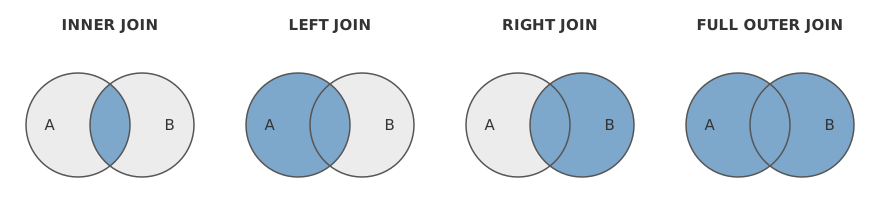
An inner join like
SELECT *
FROM A
JOIN B ON B.attr_b = A.attr_a
returns only those combinations of rows from A and B that satisfy the join condition.
An outer left join
SELECT *
FROM A
LEFT JOIN B ON B.attr_b = A.attr_a
includes all rows in A, even if there is no matching row in B (using NULL for all columns in B).
Similarly, an outer right join
SELECT *
FROM A
RIGHT JOIN B ON B.attr_b = A.attr_a
includes all rows in B, even if there is no matching row in A (using NULL for all columns in A).
There is also a full outer join, though it is rarely used, and many database systems do not support it.
Question. Some database systems do not support RIGHT JOIN. What can we do instead?
21.9 Nested queries
Let us start with a motivating example and try to find employees with the lowest hourly salary. Consider this query:
Does this work? It will only show one row in the result set (due to LIMIT 1). If multiple employees have the same lowest salary, we will see only one of them.
We can divide the problem into two steps. First, find the lowest salary:
The result is 170. Now, we can find all employees with this salary:
This works for the current state of the database, but if another employee with a lower salary is added later, the query will not return the correct result. Fortunately, we can use a nested query (returning a single value) to dynamically find the intended value (instead of “hardcoding” 170):
Similarly, we can use a nested query returning values in a single column to be used with IN. For example, to select departments with employees whose last name starts with K:
21.9.2 Useful operators involving nested queries
Standard SQL also offers the quantified comparisons ANY and ALL (e.g., hourly_salary >= ALL (nested_query)). = ANY is equivalent to IN, and <> ALL to NOT IN. They are rarely needed, and SQLite does not support them, so we do not cover them further.
EXISTS (nested_query)True if the nested query returns at least one row.
NOT EXISTS (nested_query)True if the nested query returns no rows.
For example, to select the worst paid employees in each department we can use the following query:
21.10 Common Table Expressions
A common table expression (CTE) allows us to use the result of a query as if it were a table in another query:
WITH cte_name AS (SELECT ...)
SELECT ...
FROM cte_name
...
The CTE exists only during the execution of that query. (There is also a related concept called views, which allow a query result to behave like a table for any query.)
CTEs can often be used instead of nested queries to make queries easier to read and understand.
21.10.1 Ordinary CTE
For example, to select the minimum average hourly salary across all departments, we can create a CTE named avg_salaries that calculates the average salary for each department, and then use it in the main query to find the minimum value:
21.10.2 Recursive CTE
Recursive CTEs are an advanced topic. Feel free to skim this section on first reading and return to it later.
CTEs can also be recursive, allowing the CTE to refer to itself in its definition:
WITH RECURSIVE cte_name AS (
    SELECT ... -- initial SELECT
    UNION ALL
    SELECT ... -- recursive SELECT (can reference "cte_name")
)
SELECT ...
The result of a recursive CTE is generated iteratively:
- The initial SELECT creates the first batch of rows.
- The recursive SELECT runs repeatedly to generate new batches of rows to be added to the result, with cte_name representing the last batch rows added in the previous iteration (not all rows generated so far).
- The recursion stops when the recursive SELECT produces no new rows.
The following example shows how to generate numbers from 1 to 5 using a recursive CTE:
The initial SELECT generates the first row. The recursive SELECT uses the last added row (the cte represents the rows added in the last iteration) to add a new row with the last value plus 1. This is repeated until the condition n < 5 is no longer met.
Remember to always include a condition in the recursive SELECT so that recursion terminates.
Recursive CTEs are especially useful for working with hierarchical data, such as organizational charts or category trees. For example, to select all employees and their level in the organizational hierarchy:
21.11 Summary
SELECT [DISTINCT] columns_or_expressions
FROM table
[JOIN other_table ON join_condition]
[WHERE row_condition]
[GROUP BY grouping_columns]
[HAVING group_condition]
[ORDER BY columns [ASC | DESC]]
[LIMIT n [OFFSET m]]WHEREfilters individual rows (before grouping);HAVINGfilters groups (after aggregation).JOINkeeps only matching row combinations;LEFT JOINkeeps all rows from the left table (with NULLs where there is no match).- Aggregate functions:
count,sum,avg,min,max. - Set operators between queries:
UNION [ALL],INTERSECT,EXCEPT. - Nested queries and CTEs (
WITH name AS (SELECT ...)) let us use the result of one query inside another. - Window functions (
... OVER (PARTITION BY ... ORDER BY ...)) add group statistics to individual rows without collapsing them.