In this section we will look at relational databases, and in particular at SQL, which stands for Structured Query Language. SQL is a special-purpose language designed for querying and managing data in relational databases. But what exactly are relational databases, and why should we choose them over Pandas? In this introduction, we will informally introduce relational databases, and briefly compare them to Pandas DataFrames.
What is a relational database?
A relational database is essentially a collection of named tables that are stored on data storage devices (e.g., hard drives). In the world of the relational model, these tables are referred to as relations. Each relation consists of columns (also known as attributes or fields) and rows (referred to as tuples or records).
Similar to Pandas, each column has a unique name and a specific data type (see the list of the most common data types below), which must be specified when creating the table. We can also set constraints for each attribute, such as ensuring that missing values (denoted by the reserved word NULL) are not allowed or that values within a column must be unique. Note that, unlike in Pandas, rows are not inherently ordered.
Primary key
Each table in a relational database is expected to have a primary key (PK), which is an attribute or a combination of several attributes that uniquely identifies each tuple. For example, in a table of employees with attributes like SSN (social security number), first name, last name, email and salary, the SSN (assuming it is a mandatory attribute) can be designated as the primary key because it uniquely identifies each employee.
In practice, it is common to add a special ID attribute as the primary key, and many database systems support auto-increment attributes. These auto-increment attributes automatically assign a unique numeric ID to each new row, usually starting from 1 and increasing by 1 for each new entry.
Using several relations
Imagine you’re tasked with creating a database to store exam grades for students. Initially, you might design a single table with attributes such as:
Student_ID
Student_First_Name
Student_Last_Name
Course_Code
Course_Title
Grade
Date
Assuming that all attributes are mandatory, this causes some problems:
Insertion anomaly: You cannot add a new student or a new course until the first exam results are recorded.
Deletion anomaly: Removing all the grades linked to a specific student (or a course) inadvertently results in the loss of all their other relevant information.
Update anomaly: Making updates to information, like a student’s last name due to marriage, requires changes across multiple data locations, introducing potential data inconsistencies if not executed meticulously.
Redundancy (related to the update anomaly): The same information is stored in multiple locations, leading to inefficient use of storage resources and amplifying the risk of data inconsistency.
To address these issues, you can move the student and course information to separate tables, using the Student_ID and Course_Code as primary keys, respectively:
Student(ID, First_Name, Last_Name)
Course(Code, Title)
With student and course information organized in their respective tables, we can simplify the grade information table as follows:
Grade(Student_ID, Course_Code, Grade, Date)
Exercise. What can we use as the PK in the Grade table?
When we examine a specific row in the Grade table, say (120882-34567, GRA 4142, A, 20.07.2021), and wish to retrieve the student’s name, we can just look up the student’s ID (120882-34567) in the Student table. Given that the student ID is the primary key, there cannot be multiple students with this ID. But we would also like to ensure that the student’s information is indeed available in the table.
Foreign key
A foreign key (FK) is an attribute (or a collection of attributes) that references the primary key of another table. The foreign key’s value, when not set to NULL, must match with the primary key value of an existing row within the referenced table.
Foreign keys play a pivotal role in establishing relationships between rows in different tables, ensuring referential integrity. Note that foreign keys can also be used to reference rows within the same table, e.g., in an employee table we may want to store information about who supervises each employee, where both supervisors and employees are represented within the same table.
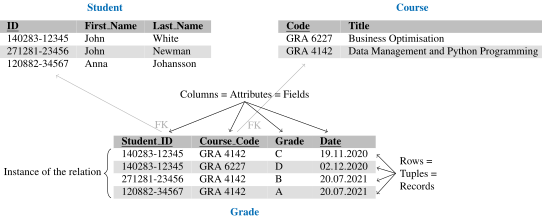
In our example, we want the Student_ID attribute in the Grade table to be a foreign key referencing the PK in the Student table, and the Course_Code attribute to be (another) FK referencing the PK in the Course table (see the figure above). This will ensure that we cannot insert a row into the Grade table that uses a non-existing student ID and/or a non-existing course code, and also makes sure that we cannot remove students or courses if there exist referencing tuples in the Grade table.
Pandas DataFrames vs. relational databases
Pandas DataFrames live in your program’s memory: they exist while your program or notebook runs, and every user works with their own copy. You can save a DataFrame to a file, but Pandas offers no way to coordinate several users or programs working with the same data at the same time.
Relational database systems are designed for exactly that scenario. They store data permanently on disk and act as a shared service: many users and applications can read and modify the same data concurrently, while the system keeps it consistent – simultaneous updates cannot corrupt each other, and constraints such as primary and foreign keys are always enforced, even if a program crashes in the middle of an operation.
Databases also handle datasets far larger than your computer’s memory, use indexes to find rows quickly without scanning whole tables, and let you describe what data you want (in SQL) rather than how to compute it step by step, leaving the “how” to the database system.
Non-relational databases
Apart from relational databases, there are also non-relational databases, often referred to as NoSQL databases. Examples of these include:
The most common data types in relational databases
BOOLEAN
INT
FLOAT
DOUBLE
DECIMAL(\(p\),\(s\)), exact numeric value with \(p\) significant digits and \(s\) digits after the decimal point.
CHAR(\(l\)), fixed-length string of length \(l\). (In some systems, a maximum value for \(l\) is 255.)
VARCHAR(\(l\)), variable-length string of maximum length of \(l\). (In some systems, a maximum value for \(l\) is 255.)
ENUM(\(s_1, s_2, \dots, s_n\)), a value from a set of allowed strings.
TEXT
DATE
DATETIME
Please note that the support for data types may vary slightly between different database systems, so always refer to the documentation of the specific system you are using for precise information.